TSF automatically adds a noindex robots meta directive to empty categories in WordPress. This tells search engines not to index the category page.
A category with no posts has no meaningful content. WordPress may return a 404 for it, but not always. Either way, indexing an empty page hurts your site’s SEO — search engines see it as thin content.
TSF handles this by setting noindex on any category that has zero published posts assigned to it.
How do I fix it?
Assign posts to the category. Once a category has at least one published post, TSF removes the automatic noindex directive.
How do I overwrite it?
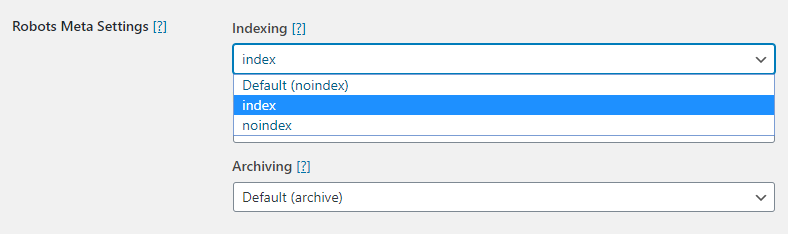
If you want the category indexed even while it’s empty, you can override the indexing state via the category’s visibility settings. Edit the category in your WordPress admin and look for TSF’s indexing option under the visibility settings.
This may cause issues since WordPress may return a 404 for the category.
How do I turn it off for all empty archives?
Use the the_seo_framework_enable_noindex_no_posts filter to stop TSF from adding noindex to empty archives on your WordPress site. Use it only for archives that have useful content but no posts attached.
add_filter( 'the_seo_framework_enable_noindex_no_posts', '__return_false' );
Since v5.2, TSF applies this filter wherever it generates robots meta from arguments, not only when it outputs the page’s robots meta tag. The SEO Bar, the term editor’s Default label, and the sitemap follow the returned value for empty terms. Empty author archives follow it as well.